-->

Spiga

FLAT FILE DATA TRANSACTION USING OWB 10g Part- 2


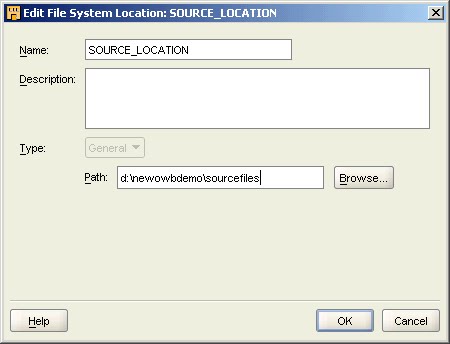
The Edit File System Location: SOURCE_LOCATION1 window:


 In the Edit File System Location: SOURCE_LOCATION1 window, rename the default name SOURCE_LOCATION1 to SOURCE_LOCATION.

Click Browse.


The Edit File System Location, Browse Directory window:
 
In the Browse Directory window, select  or the drive and directory (which contains the source folders) where you saved the Data File.
Connection Information :

Ensure that Import after finish is selected. Selecting this option launches the Import Metadata Wizard. Click Next.      
Tip: If the check box is not selected, the Import Metadata Wizard does not launch automatically. To launch the Import Metadata Wizard manually, in Project Explorer, expand Files, right-click the SOURCE module, and select Import.


Summary page:

On the Summary page, review the module settings. Click Finish.


FLAT FILE DATA TRANSACTION USING OWB 10g Part- 3

FLAT FILE DATA TRANSACTION USING OWB 10g Part - 1

Flat files are a typical data source for warehouse projects. Here, you learn how to create a flat file source module. Modules are storage objects within projects that help you logically group source and target object definitions. Source modules hold metadata describing source systems from which you extract data. Target modules hold metadata describing your target data warehouse or data marts.

A flat file source module defines a connection to a folder that contains a number of flat file sample files. You learn how to use the wizard to import flat file metadata into the flat file source module.  
 
 
Right-click the Files node and select New.


The Create Module Wizard: Welcome page:

Click Next

The Create Module Wizard: Name and Description page:

Enter SOURCE as the name for the module. And click Next.
 
 
The Create Module Wizard: Connection Information page:

OWB creates a default location,  SOURCE_LOCATION1. Click Edit.


FLAT FILE DATA TRANSACTION USING OWB 10g Part - 2

Oracle Application Server 10g Release2 Spet By Spet Installation


1) Oracle 10g R2  "Welcome Screen"


Click "Deinstall Product" to Remove the existing Oracle From The Server.

Click next to Install Oracle 10g R2.


2) "Specify File Locations"

Source Path :   Where the installer is located.
Destination Name :  Oracle instance name.
Destination Path :  Installation path.

Click Next.

Dual Dropped and Recreation..

SQL> DROP TABLE SYS.DUAL ;

Table dropped.

SQL> CREATE TABLE SYS.DUAL
2  (
3    DUMMY  VARCHAR2(1 BYTE)
4  )
5  TABLESPACE SYSTEM;

Table created.

SQL> CREATE PUBLIC SYNONYM DUAL FOR SYS.DUAL;

Synonym created.

SQL> GRANT SELECT ON SYS.DUAL TO PUBLIC WITH GRANT OPTION;

Grant succeeded.

SQL> INSERT INTO dual VALUES ('X');

1 row created.


SQL> SELECT * FROM dual;

D                                                                               
-                                                                               
X  

SQL SERVER Questions And Answers Page 5

1. What is deadlock?

A dead lock is a situation in which two users (or transactions) have locks on separate objects, and each user is waiting for a lock on the other’s object. It usually occurs in a multi-user environment.

2. What are triggers?

A trigger is a block of code that constitutes with a set of T-SQL statements that are activated in response to certain actions. A trigger can also be interpreted as a special kind of stored procedure that is executed whenever an action, such as data modification, takes place.
A trigger is always defined on a table, and is said to have fired whenever the data in the underlying table is affected by any of the Data Manipulation Language (DML) statements-INSERT, UPDATE, or DELETE. A trigger fires in response to an event like insertion, updation, and deletion of data.
Triggers help in maintaining consistent, reliable, and correct data in tables. They enable the performance of complex actions and cascade these actions to other dependant tables.
Characteristics of a trigger:

· It can be associated with tables.
· It cannot be defined on temporary tables or views. However, it can reference temporary tables and views.
· Whenever any data modification statement is issued then SQL Server fires it automatically.
· It cannot be explicitly invoked or executed, as in the case of stored procedures.
· Triggers can be nested up to 16 levels. The nesting of triggers occurs when a trigger performs an action that initiates another trigger.
· It prevents incorrect, unauthorized, and inconsistent changes in data.
· It cannot return data to the user.

There are three types of triggers
1) INSERT
2) DELETE
3) UPDATE

3. What is Normalization? Explain three normal forms?

Normalization is a scientific method of breaking down complex table structures in to simple table structures by using certain rules. Hence reduce redundancy in a table and eliminate inconsistency problems and disk space usage.

First Normal Form
A table is said to be in 1NF when each cell of the table contains precisely one value.
Functional dependency
If you have two attribute A and B, A is said to be functionally dependant on B, if for each value of B, there is exactly one value of A.

Second Normal Form
Identify the functionally dependent keys and place them in a different table.

Third Normal Form
A relation is said to be 3NF when every non-key attribute is functionally dependant only on the primary key.

SQL SERVER Questions And Answers Page 4

1. Explain about BCP and DTS.

BCP
The transfer data from an external source to SQL Server is performed using Bulk Copy Program utility. The external source is a flat file. Data transfer from external source to SQL Server in BCP IN. The transfer of data from SQL Server to external source is BCP OUT.
DTS
Data transformation services can be used to import and export data between heterogeneous data sources and SQL Server. The external data sources include Visual FoxPro, MS Excel, Paradox, MS Access, Dbase, and text files.

2.What are transactions and their properties?

A transaction is a sequence of operations performed together as a single unit of logical work. It has four properties.
Atomicity – it states that either all the data modifications are performed or none are performed.
Consistency - it states that all the data is in a consistent state after a successful completion of transaction.
Isolation – it states any data modification made my concurrent transactions must be isolated from the modifications made by other concurrent transaction.
Durability – it states that ay change made by a completed transaction remains permanently in the system.

3.Locking mechanism.

SQL Server uses the concept of locking to ensure transactional integrity and database consistency. Locking, by functionally prevents users from accessing information being changed by other users. In a multi-user environment, Locking prevents users from changing the same data at the same time. In SQL Server locking is implemented automatically.

SQL Server implements multi-granular locking, which allows transactions to lock different types of resources at different levels. SQL Server can lock the following resources.

RID – is a row identifier that individually locks a row in a table.
Key – is a rowlock with in an index.
Page – is an 8k page or an index page.
Extent – is a contiguous group of 8k data pages or index pages.
Table – is the entire table, including all data and indexes.
Database – is the complete database.

Shared Locks
It is used for operations that do not change or update the data. This allows concurrent transactions to read a resource and no other transaction can modify the data on that resource.
Update Locks
This lock is implemented when a transaction modify a row. Only one update lock is allowed on a resource at a time.
Exclusive locks
Intent locks
Schema Locks

SQL SERVER Questions And Answers Page 3

1. What are indexes?

To speed up data retrieval indexes are used. Indexes also enforce the uniqueness of rows.
Advantages
1. Improves the speed of execution.
2. Enforces uniqueness of data.
3. Speeds up joins between tables.
Disadvantages
1.Takes disk space to store.
2.Data modification takes longer.
3.Takes time to create index.

Types of indexes
Clustered index

1.The data is physically sorted
2.One clustered index can be created per table, so you should build it on attributes that have a high percentage of unique values and that are not modified often.
Nonclustered index
1.The physical order of the rows is not the same as the index order.
2.There can be as many as 249 nonclustered indexes per column.

2.What are views?

A view is a virtual table, which gives access to a subset of columns from one or more tables. It is a query stored as an object in the database. Hence a view is an object that derives it data from one or more tables.
Advantages
1.A view serves as a security mechanism.
2.A view simplifies the usage of complex queries.

3. What are store procedures and its advantages?

A stored procedure is collection or batch of Transact-SQL statements and control flow language that is stored under one name, and executed as single unit. It helps in improving the performance of a query. It is a precompiled object. As it is ready to execute no time is needed for parsing and compiling the procedure.
Advantages
Improved performance – Applications do not have to compile the procedure over and over again.
Reduction in network congestion – applications need not submit multiple SQL statements to server for the purpose of processing.
Enhanced accuracy – SQL statements included in a procedure are designed by experienced programmers and are therefore more efficient, error free, and tested.
Better security mechanism – users can be granted permission to execute a stored procedure even if they do not own it.
Types of stored procedures
1.User-defined
2.System defined

These are prefixed with sp_. These are for administrative purpose and are stored in the database and are accessible to all users.
3.Temporary
These are prefixed with #, stored in tempdb and are automatically dropped when connection terminates.
4.Remote
These are created and stored in remote servers and can accessed by users with appropriate permissions.
5.Extended
These are dlls that are executed outside SQL Server. They are prefixed by xp_.

SQL SERVER Questions And Answers Page 2

1. What is a sub query?

Sometimes the results of one query are dependant on the results of another query. For this purpose one query is nested inside another query, this is called as sub query.

2. What are the types of constraints?

You can enforce data integrity by using constraints. Constraints are divided in to five categories.
Primary key constraint
A primary key constraint is defined on a column are a set of columns whose values uniquely identify the rows in a table. It cannot contain null values.
Unique constraint
Unique constraints are used to enforce uniqueness on non-primary key columns. It allows null values but only one row can have a null value.Multiple unique constraints can be created on a table.
Foreign Key constraint
You can use the foreign key constraint to remove the inconsistency in two tables when the data in the one table is dependant on the other table.
Check constraint
It enforces domain integrity by restricting the values to be inserted in a column. It is possible to define multiple check constraints on a single column. These are evaluated in the order in which they are defined.
Default Constraint
A default constraint can be use to assign a constant value to a column and the user need not insert values in to that column.

3.What is a rule?

The required integrity can be enforced by specifying a check constraint or by defining a rule. But check constraint modifies the table structure. The constraint can there fore be implemented using rules with out changing the table structure. This rule is applied before an insert or update statement .A rule must be bound to a column or a user-define d data type. This is done using stored procedure sp_bindrule. Rules do not apply to data that has already been inserted in the table. The existing values in tables do not have to meet the criteria specified by the rule.

SQL SERVER Questions And Answers Page 1

1. What is an Entity?

The basic data item stored in database is called entity. An entity can be any object, item, place, person, concept, or activity about which data is stored.

2. What is an attribute?

An attribute is a property of an entity. It describes a part of an entity. Entity could have one or more attributes.

3. What is ER diagram?

An Entity Relationship Diagram is diagrammatic representation of the logical structure of a database system.

4.Describe the concept of keys.

Candidate key
An attribute that uniquely identifies a row is called candidate key. It is also called das surrogate key.
Primary key
A candidate key that you choose to identify rows uniquely is called a primary key.
Alternate key
If there are multiple candidate keys in a table, the candidate keys that are chosen as primary key are called the alternate keys.
Composite key
When the key that uniquely identifies the rows of a table is made up of more than one attribute, it is called as a composite key.
Foreign key
Two tables can be related using a common attribute. When a primary key of one table is also available as an attribute in another related table it is called a foreign key.

5.What are joins?

Sometimes, data from multiple tables is to be displayed using select statement. For this purpose, the tables in use must have a column that is equated. This is termed as simple join or multiple join.Sometimes, you might want to display all records from one table and some from another. This type of join is called an outer join. An outer join is only possible between two tables.
There are two types of outer join, namely left and right. In a left outer join, all the rows of the first table named in the FROM clause are displayed. In a right outer join all the rows from the second table mentioned in the FROM clause are displayed. In either case, all the matching rows from other table are displayed.

ORACLE JOBS

TO GET ORACLE PL/SQL , D2K , WAREHOUSE , ETL JOBS .....
EXP - 0 to 10 Yr ....
CTC - 1.8 L/A to 12 L/A .....

Why Data Warehouse

"We have mountains of data in this company, but we can’t access it."
"We need to slice and dice the data every which way."
"You’ve got to make it easy for business people to get at the data directly."
"Just show me what is important."
"It drives me crazy to have two people present the same business metrics at a meeting, but with different numbers."
"We want people to use information to support more fact-based decision making."

Let’s turn these business management quotations into data warehouse requirements.

The data warehouse must make an organization’s information easily accessible.
The contents of the data warehouse must be understandable. The data must be intuitive and obvious to the business user, not merely the developer. nderstandability implies legibility; the contents of the data warehouse need to be labeled meaningfully. Business users want to separate and combine the data in the warehouse in endless combinations, a process commonly referred to as slicing and dicing.
The tools that access the data warehouse must be simple and easy to use. They also must return query results to the user with minimal wait times.

The data warehouse must present the organization’s information consistently.
The data in the warehouse must be credible. Data must be carefully assembled from a variety of sources around the organization, cleansed, quality assured, and released only when it is fit for user consumption. Information from one business process should match with information from another. If two performance measures have the same name, then they must mean the same thing. Conversely, if two measures don’t mean the same thing, then they should be labeled differently. Consistent information means high-quality information. It means that all the data is accounted for and complete. Consistency also implies that common definitions for the contents of the data warehouse are available for users.


The data warehouse must be adaptive and resilient to change.
We simply can’t avoid change. User needs, business conditions, data, and technology are all subject to the shifting sands of time. The data warehouse must be designed to handle this inevitable change. Changes to the data warehouse should be graceful, meaning that they don’t invalidate existing data or applications. The existing data and applications should not be changed or disrupted when the business community asks new questions or new data is added to the warehouse. If descriptive data in the warehouse is modified, we must account for the changes appropriately.

The data warehouse must be a secure bastion that protects our information assets.
An organization’s informational crown jewels are stored in the data warehouse. At a minimum, the warehouse likely contains information about what we’re selling to whom at what price potentially harmful details in the hands of the wrong people. The data warehouse must effectively control access to the organization’s confidential information.

The data warehouse must serve as the foundation for improved decision making.
The data warehouse must have the right data in it to support decision making. There is only one true output from a data warehouse: the decisions that are made after the data warehouse has presented its evidence. These decisions deliver the business impact and value attributable to the warehouse. The original label that predates the data warehouse is still the best description of what we are designing: a decision support system.

The business community must accept the data warehouse if it is to be deemed successful.
It doesn’t matter that we’ve built an elegant solution using best-of-breed products and platforms. If the business community has not embraced the data warehouse and continued to use it actively six months after training, then we have failed the acceptance test. Unlike an operational system rewrite, where business users have no choice but to use the new system, data warehouse usage is sometimes optional. Business user acceptance has more to do with simplicity than anything else. As this list illustrates, successful data warehousing demands much more than being a stellar DBA or technician. With a data warehousing initiative, we have one foot in our information technology (IT) comfort zone, while our other foot is on the unfamiliar turf of business users. We must straddle the two, modifying some of our tried-and-true skills to adapt to the unique demands of data warehousing. Clearly, we need to bring a bevy of skills to the party to behave like we’re a hybrid DBA/MBA.

Built-in Datatype Summary for 10g R 2(10.2)

VARCHAR2(size [BYTE | CHAR])

Variable-length character string having maximum length size bytes or characters. Maximum size is 4000 bytes or characters,and minimum is 1 byte or 1 character. You must specify size for VARCHAR2.
BYTE indicates that the column will have byte length semantics;
CHAR indicates that the column will have character semantics.

NVARCHAR2(size)

Variable-length Unicode character string having maximum length size characters. The number of bytes can be up to two times size for AL16UTF16 encoding and three times size for UTF8 encoding. Maximum size is determined by the national character set definition, with an upper limit of 4000 bytes. You must specify size for NVARCHAR2.

NUMBER[(precision [, scale]])

Number having precision p and scale s. The precision p can range from 1 to 38. The scale s can range from -84 to 127.

LONG

Character data of variable length up to 2 gigabytes, or 2 bytes. Provided for backward compatibility.

DATE

Valid date range from January 1, 4712 BC to December 31, 9999 AD. The default format is determined explicitly by the NLS_DATE_FORMAT parameter or implicitly by the NLS_TERRITORY parameter. The size is fixed at 7 bytes. This datatype contains the datetime fields YEAR, MONTH, DAY, HOUR, MINUTE, and SECOND.It does not have fractional seconds or a time zone.

BINARY_FLOAT

32-bit floating point number. This datatype requires 5 bytes,including the length byte.

BINARY_DOUBLE

64-bit floating point number. This datatype requires 9 bytes,including the length byte.

TIMESTAMP [(fractional_seconds)]

Year, month, and day values of date, as well as hour, minute,and second values of time, where fractional_seconds_precision is the number of digits in the fractional part of the SECOND datetime field. Accepted values of fractional_seconds_precision are 0 to 9. The default is 6. The default format is determined explicitly by the NLS_DATE_FORMAT parameter or implicitly by the NLS_TERRITORY parameter. The sizes varies from 7 to 11 bytes, depending on the precision. This datatype contains the datetime fields YEAR, MONTH, DAY, HOUR, MINUTE, and SECOND. It contains fractional seconds but does not have a time zone.

TIMESTAMP [(fractional_seconds)] WITH TIME ZONE

All values of TIMESTAMP as well as time zone displacement value, where fractional_seconds_precision is the number of digits in the fractional part of the SECOND datetime field. Accepted values are 0 to 9. The default is 6. The default format is determined explicitly by the NLS_DATE_FORMAT parameter or implicitly by the NLS_TERRITORY parameter. The size is fixed at 13 bytes. This datatype contains the datetime fields YEAR, MONTH, DAY, HOUR, MINUTE, SECOND, TIMEZONE_HOUR, and TIMEZONE_MINUTE. It has fractional seconds and an explicit time zone.

TIMESTAMP [(fractional_seconds)] WITH LOCAL TIME ZONE

All values of TIMESTAMP WITH TIME ZONE, with the following
exceptions:
** Data is normalized to the database time zone when it is stored in the database.
** When the data is retrieved, users see the data in the session time zone.
The default format is determined explicitly by the NLS_DATE_FORMAT parameter or implicitly by the NLS_TERRITORY parameter. The sizes varies from 7 to 11 bytes, depending on the precision.

INTERVAL YEAR [(year_precision)] TO MONTH

Stores a period of time in years and months, where year_precision is the number of digits in the YEAR datetime field.Accepted values are 0 to 9. The default is 2. The size is fixed at 5 bytes.

INTERVAL DAY [(day_precision)] TO SECOND [(fractional_seconds)]

Stores a period of time in days, hours, minutes, and seconds,where day_precision is the maximum number of digits in the DAY datetime field. Accepted values are 0 to 9. The default is 2.And fractional_seconds_precision is the number of digits in the fractional part of the SECOND field. Accepted values are 0 to 9. The default is 6.The size is fixed at 11 bytes.

RAW(size)

Raw binary data of length size bytes. Maximum size is 2000 bytes. You must specify size for a RAW value.

LONG RAW

Raw binary data of variable length up to 2 gigabytes.

ROWID

Base 64 string representing the unique address of a row in its table. This datatype is primarily for values returned by the ROWID pseudocolumn.

UROWID [(size)]

Base 64 string representing the logical address of a row of an index-organized table. The optional size is the size of a column of type UROWID. The maximum size and default is 4000 bytes.

CHAR [(size [BYTE | CHAR])]

Fixed-length character data of length size bytes. Maximum size is 2000 bytes or characters. Default and minimum size is 1 byte.BYTE and CHAR have the same semantics as for VARCHAR2.

NCHAR[(size)]

Fixed-length character data of length size characters. The number of bytes can be up to two times size for AL16UTF16 encoding and three times size for UTF8 encoding. Maximum size is determined by the national character set definition, with an upper limit of 2000 bytes. Default and minimum size is 1 character.

CLOB

A character large object containing single-byte or multibyte characters. Both fixed-width and variable-width character sets are supported, both using the database character set. Maximum size is (4 gigabytes - 1) * (database block size).

NCLOB

A character large object containing Unicode characters. Both fixed-width and variable-width character sets are supported,both using the database national character set. Maximum size is (4 gigabytes - 1) * (database block size). Stores national character set data.

BLOB

A binary large object. Maximum size is (4 gigabytes - 1) * (database block size).

BFILE

Contains a locator to a large binary file stored outside the database. Enables byte stream I/O access to external LOBs residing on the database server. Maximum size is 4 gigabytes.


Syntax for SQL functions

Page 1 :-

ABS

ABS(n)

ACOS
ACOS(n)

ADD_MONTHS
ADD_MONTHS(date, integer)

analytic_function
analytic_function([ arguments ]) OVER (analytic_clause)

APPENDCHILDXML
APPENDCHILDXML ( XMLType_instance, XPath_string, value_expr [, namespace_string ])

ASCII
ASCII(char)

ASCIISTR
ASCIISTR(char)

ASIN
ASIN(n)

ATAN
ATAN(n)

ATAN2
ATAN2(n1 { , | / } n2)

AVG
AVG([ DISTINCT | ALL ] expr) [ OVER(analytic_clause) ]

BFILENAME
BFILENAME('directory', 'filename')

BIN_TO_NUM
BIN_TO_NUM(expr [, expr ]... )

BITAND
BITAND(expr1, expr2)

CARDINALITY
CARDINALITY(nested_table)

CAST
CAST({ expr | MULTISET (subquery) } AS type_name)

CEIL
CEIL(n)

CHARTOROWID
CHARTOROWID(char)

CHR
CHR(n [ USING NCHAR_CS ])

CLUSTER_ID
CLUSTER_ID ( [ schema . ] model mining_attribute_clause )

CLUSTER_PROBABILITY
CLUSTER_PROBABILITY ( [ schema . ] model [ , cluster_id ] mining_attribute_clause )

CLUSTER_SET
CLUSTER_SET ( [ schema . ] model [ , topN [ , cutoff ] ] mining_attribute_clause ) COALESCE
COALESCE(expr [, expr ]...)


COLLECT
COLLECT (column)

COMPOSE
COMPOSE(char)

CONCAT
CONCAT(char1, char2)

CONVERT
CONVERT(char, dest_char_set[, source_char_set ])

CORR
CORR(expr1, expr2) [ OVER (analytic_clause) ]

CORR_K, CORR_S
{ CORR_K | CORR_S } (expr1, expr2 [, { COEFFICIENT | ONE_SIDED_SIG | ONE_SIDED_SIG_POS | ONE_SIDED_SIG_NEG | TWO_SIDED_SIG } ] )

Before Facing PL/SQL Interview

# SQL : The language used to access a relational database is called SQL

# DRL- (I)Select

# DML-

(I) Insert

(II) Update

(III) Delete

# DDL-

(I) Create

(II) Alter

(III) Drop

(IV) Rename

(V) Truncate

# TCL-

(I) Commit

(II) Savepoint

(III) Rollback


# DCL-

(I)Grant

(II) Revoke


# NULL: In database terms, nothing is called null.

# DISTINCT: To obtain unique value or a column contains duplicate value.

# PRIMARY KEY: Is an column used for identifying the uniqueness of each row in table.

# FORGIN KEY: Then common column appering in the chilled table is referenced as forgin key .

# JOIN : Is a query that combaine row from two are more table,view,M.view,

# CARTATION PRODUCT: Is a join query without join condition.

# EQUI/SIMPAL/INNER JOIN : Is a join query with a join condition .Containg an equality (=) oprator.

# TABLE ALIAS : Can be used table of names.

# SELF JOIN : It’s a join of table to itself.

# NON EQUI JOIN: When join condition that are executed when such as no column in one table cooesponding directly to a column in other tables.

# OUTER JOIN(which table want null use + sign) : An outer join extends the result of
Simpal join.

# ANSI/ISO JOIN SYNTAX : join table name on join condition From Emp join dept
on Emp.deptno=Dept.deptno;

# How many comparision do you need : - If you join N table then N-1 join condition here.

# NATURAL JOIN: Is a join between two table where oracles join the table according to the columns in the two table sharing in the same name.

# CROSS JOIN: ISO syantax producing creationproduct through use of cross join.

# GROUP FUNCTON : The data from main query can be displayed by using a group function is a sub query.

# SUB QUERY : Query within a query OR select statement nested within select statement.

# TYPES OF SUB QUERY:

1.Single Row Sub Query :Main query expect return only one value.
2.Multipel Row Sub Query : Return more the one row.
3.Inline(Inline view) Row Sub Query :Is a sub query use in from clause.
4.Multipel Column Sub Query : Return more then one column of return data in condition.

# Constrints : Are used to define an intigrity constraints, as rule that restrict the value in Database.

# Data Intigrity: It’s a state in which all the data value stored in database collect.

1.Entity Intigrity : It define a row as unique Enitity for particular table.
2.Domain Intigrity :Validates the entries for a given column.
3.Refrential Intigrity :Define relationship between tables where record are entered are deleted.
4.User define Intigrity : allow to difine specfic business rule that to not full into any one of the other Intigrity catgories.

# UNIQUE KEY : Enforce uniquness on value in constraints columns.

# CHECK : Enforce to value add to constraint column must be present static list.

# NOT NULL : Column such that the column may not be null for any row.

# SEQUENCE : Database object that genrate integer according to rules specified at time of
sequence is creation.

# INDEXES : Are schema objects that provide a mapping of all the values in the table column.

1.B-TREE INDEX: Nornaml Index
2.BETMAP INDEX : Store rowed associated with key value Bitmap.
3.PARTIONED INDEX : Table Data can pe partion is posible
4.FUNCTION BASED INDEX :They are based on expression
5.DOMAIN INDEX :Instance of application specific index of type index type.
6.REVECE KEY INDEX :

# Synonmys: Schema objects which act as an alternate name for an existing objects.

1.Private Synonmys
2.Public Synonmys

# EXISTS OPRATER : Test to existence of row in sequence.

# ROWNUM: Is a result set row postion show after transaction.

# SCHEMA: Is a logical grouping of database objects based on userwho own the objects.

# PL/SQL : Stands for procedurial language Extention to SQL.

1.Anonymoys Block :
2.Named Block:
3.Sub Programed Block:

# CURSSOR: Used to process multipal row retrival from database(with select statement).
OR
Is a Handler or Pointer to the context area.
1.Implicity Cursor :
2.Ecplicit Cursor
3.Refrence Cursor

# CURSOR ATTRIBUTE :

1.NOT FOUND
2.FOUND
3.ISOPEN
4.ROWCOUNT

# EXCEPTION: To handle unpredictable situation ,plsql provide mechnisum is known as Exception.

1.EXCEPTION HANDLING :
2.EXCEPTION TRAPING :
3.EXCEPTION PROPOGATION :

Genral Categories:
1) System define Exception
2)User Define Exception

# PROCEDURE : Is a named program unit that can be called on directly buy its name.
( Not pass littreal)

# FUNCTION : Is a named program unit that return atlest singal value.

# PACKAGE : Is simpaly collection of related type procedure,functions.

1.SPECFFICATION
2.BODY

# TRIGEER: Is a named pl/sql block stored in database and executed implicit when trigeer event is occurs.

# COLLECTION : Manupulate many variable at once as one unit DATA TYPE LIKE.

1.INDEX BY TABLE : Non scaler Type
2.NEXTED TABLE : created sequential key& like key can not be negative.
3.VARRY: Is data type ,simlar ina rray.

# Query : Its an opration that retrive data from one are more table or view.

USE EXISTS IN PLACE OF DISTINCT

The DISTINCT combination of deptno and dname columns have to be displayed. Only those rows need be displayed, whose deptno exists in the EMP table.
Query 1
SELECT DISTINCT E.deptno,D.dname
FROM emp E,dept D
WHERE D.deptno = E.deptno;


OPERATIONOPTIONSOBJECT_NAMECOST
SELECT STATEMENT

14659
SORTUNIQUE
14659
HASH JOIN

1000
TABLE ACCESSFULLDEPT1
TABLE ACCESSFULLEMP822

Query 2
SELECT D.deptno,D.dname
FROM dept D
WHERE EXISTS ( SELECT 'X'
FROM emp E
WHERE E.deptno = D.deptno );


OPERATIONOPTIONSOBJECT_NAMECOST
SELECT STATEMENT

1
FILTER


TABLE ACCESSFULLDEPT1
TABLE ACCESSFULLEMP1822

Inference
There is a reduction of more than 97% in estimated cost.In the query using the DISTINCT clause, the explain plan shows that there is a HASH join between the two tables. In this, the smaller of the two tables (in this case the DEPT table) is converted into a hash table and stored in memory. For every row of the larger table (EMP table) retrieved, the hash table is scanned to check for the join condition.
The query using EXISTS uses a FILTER operation. The FILTER operation accepts a set of rows, eliminates some of them, and returns the rest. In the above case, the rows from the DEPT and EMP table are filtered out based on the join condition. EXISTS is a faster and a cheaper alternative because the optimizer realizes that when the sub-query has been satisfied once, there is no need to proceed any further, and the next driving row can be fetched. In the example shown only one row needs to be returned from dept even though many rows in emp might match the subquery.

AVOID USING SUBSTR FUNCTION ON INDEXED COLUMNS

A non unique index exists on the ename column of the emp table(ie ENAME_INDX). All employees with their names having the first two letters as 'KI' have to be selected.

Query 1

SELECT ename FROM emp
WHERE SUBSTR (ename,1,2) = 'KI';


OPERATIONOPTIONSOBJECT_NAMECOST
SELECT STATEMENT

822
TABLE ACCESSFULLEMP822

Query 2

SELECT ename FROM emp
WHERE ename LIKE 'KI%';


OPERATIONOPTIONSOBJECT_NAMECOST
SELECT STATEMENT

148
INDEXRANGE SCANENAME_INDX148

Inference

Here again, the cost is reduced by more than 82% by avoiding the use of SUBSTR function in the WHERE clause. As explained above, the Optimizer will not make use of the index even though it is available, since there is a function on the indexed column in the WHERE condition.

AVOID USING UPPER OR LOWER FUNCTIONS ON COLUMNS WHICH ARE INDEXED

A non unique index exists on the ename column of the emp table (ie ENAME_INDX). All employees having the name 'KING' have to be selected.

Query 1
SELECT ename FROM emp
WHERE UPPER (ename) = 'KING';

or

SELECT ename FROM emp
WHERE LOWER(ename) = 'king';


OPERATIONOPTIONSOBJECT_NAMECOST
SELECT STATEMENT

822
TABLE ACCESSFULLEMP822

Query 2
SELECT ename FROM emp
WHERE ename='KING';


OPERATIONOPTIONSOBJECT_NAMECOST
SELECT STATEMENT

2
INDEXRANGE SCANENAME_INDX2

Inference
The cost is reduced by an incredible 99% when the use of functions in the WHERE clause is eliminated.
Thus, even though the leading column of the index forms a part of the WHERE clause, the available index will not be used. This is because, an SQL function is applied to that column. In such cases, the Oracle Optimizer will not make use of the available index and will opt for a FULL scan on the table. The optimizer has to apply the function to the value in each row which satisfy the condition specified which increases the cost incurred.

MAKE THE MOST OFTEN USED COLUMN IN A WHERE CLAUSE AS THE LEADING COLUMN IN A CONCATENATED INDEX

A composite index exists on the empno and deptno columns of the emp table (i.e. EMPNO_DEPTNO_INDX in which empno is the leading column). All employees belonging to department 10 have to be selected.

Query 1

SELECT * FROM emp
WHERE deptno = 10;


OPERATIONOPTIONSOBJECT_NAMECOST
SELECT STATEMENT

822
TABLE ACCESSFULLEMP822


Query 2

SELECT * FROM emp
WHERE empno > 0 AND deptno = 10;


OPERATIONOPTIONSOBJECT_NAMECOST
SELECT STATEMENT

293
TABLE ACCESSBY INDEX ROWIDEMP293
INDEXRANGE SCANEMPNO_DEPTNO_INDX26


Inference
There is a huge cost difference between the above two queries, almost a 62% reduction in the cost when the second approach is used.
Thus, the leading column should be the most selective column, and it should also be the column most often used by limiting conditions in queries. So it is advisable to include a dummy WHERE clause for such queries as shown in the second query.

SQL Standards

It is essential to standardize the way the SQL statements are written. This not only ensures that identical statements performing the same tasks are shared but also provides the ease of reading the statements.

If the list of employees whose salary is greater than the average salary of their respective department is to be found: -

The inappropriate way of writing the query

select ename,job,sal,comm,hiredate,deptno from emp e1 where sal > (select avg(sal) from emp e2 where e2.deptno=e1.deptno);

The appropriate way of writing the query


SELECT ename,job,sal,comm,hiredate,deptno
FROM emp E1
WHERE sal >
(SELECT AVG(sal)
FROM emp E2
WHERE E2.deptno=E1.deptno);

There is also a technical reason to use a set style throughout the organization. If the statement it is trying to parse, does not match a statement in the shared pool precisely, character by character, and case for case, Oracle will not re-use the parsed statement and instead will opt to create a new cursor. This means your statement will have to undergo the Oracle parse, bind, execute, and fetch phases again. Also the extra resources in the library cache will be added to maintain this copy of a statement. You may actually age out a statement frequently used if the shared pool is too small.

In the following section we would be looking into various situations. Under each scenario the appropriate way to write the query and an inappropriate way to write the query is discussed. It should be noted that both the compared queries return the same results, the only difference being the efficiency. The whole section deals with two tables, namely EMP and DEPT. Their structures are given below: -

EMP table

EMPNO NOT NULL NUMBER(4)
ENAME VARCHAR2(10)
JOB VARCHAR2(9)
MGR NUMBER(4)
HIREDATE DATE
SAL NUMBER(7,2)
COMM NUMBER(7,2)
DEPTNO NOT NULL NUMBER(2)

DEPT Table

DEPTNO NOT NULL NUMBER(2)
DNAME VARCHAR2(14)
LOC VARCHAR2(13)

DEPTNO from the EMP table references the DEPT table. EMPNO column is the primary key in the EMP table and DEPTNO is the primary key in the DEPT table. EMP table has 9.5 lac rows. DEPT table has 4 rows. It is assumed that none of the columns have indexes unless specified. The cost depicted in the results may vary according to the size of the table and the number of distinct values in the columns. Also note that the tables used here are created in a test environment and more real time examples will be added later as and when they come up considering the fact that this is the first iteration of the document. It is also worth mentioning that Indexes should be made use of on column, only after carefully considering the frequency and type of activities on the column in question.

SQL Processing

Here's an overview about the SQL processing which will help appreciate the need for the better-written SQL statements.

SQL Processing Phases

1. Open
2. Parse
3. Bind
4. Execute
5. Fetch (Select statements)
6. Close

($$) The PARSE phase
Checks to see if the statement already exists in the shared pool.
Checks to see if the statement is valid SQL language.
Oracle will then look to see if the referenced objects exist.
Oracle will see if the parsing user has permission on all underlying objects.
Explodes any queries on views and attempts to simplify the statement by using a join.
Picks an execution plan and stores it with the cursor

($$) The BIND phase
Searches statement for bind variables
Assigns a value to the parsed statement.

($$) The execute phase
Oracle will then run the execution plan against the block buffers.
Oracle performs all the required input and output calls to gather the data for the DMLstatement. This phase may require Oracle to perform sorting operations.

($$) The FETCH phase
Retrieve all the rows for the select statement.
Possibly sort the retrieved records.
All returned rows are retrieved using an array fetch.